Arrows Icon Set 4: A Versatile Tool for Designers and Developers
In the world of design and development, icons play a crucial role in conveying meaning, guiding users, and enhancing visual communication. Among the many icon sets available, the Arrows Icon Set 4 stands out as a meticulously crafted collection that offers a wide range of arrow styles suitable for various applications. Whether you're working on a website, a presentation, or printed materials, this set provides the perfect tools to elevate your designs.
What Is Arrows Icon Set 4?
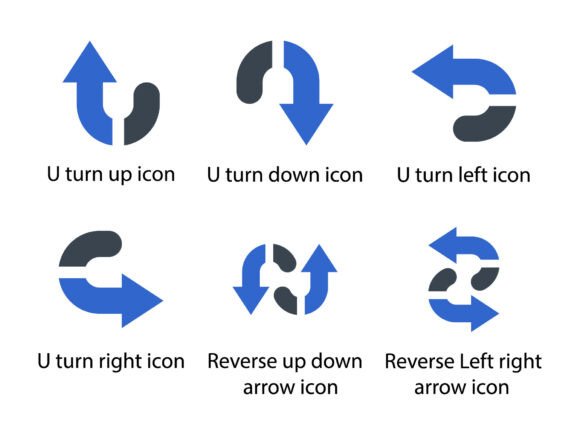
The Arrows Icon Set 4 is a comprehensive collection of arrow-shaped glyphs designed with precision and elegance. Each icon in the set is carefully crafted to ensure clarity, consistency, and visual appeal. The set includes a variety of arrow directions, such as U-turn up, U-turn down, U-turn left, U-turn right, reverse up down, and reverse left right. These icons are not only functional but also aesthetically pleasing, making them ideal for a wide range of design projects.
One of the standout features of this icon set is its attention to detail. The arrows are designed with clean lines, smooth curves, and balanced proportions, ensuring they look great at any size. Whether you're using them in a digital interface or a print layout, the quality remains consistent, providing a professional finish to your work.
Why Arrows Are Important in Design
Arrows are more than just simple symbols; they serve as powerful visual cues that guide users through interfaces, highlight directions, and indicate movement. In web design, for example, arrows can be used to show navigation paths, indicate scrolling, or draw attention to specific elements. In presentations, they help illustrate processes, sequences, and relationships between ideas.
When it comes to printed materials, such as brochures, posters, or infographics, arrows can help organize information and make complex data easier to understand. They provide a clear visual language that transcends text, making them an essential tool for designers and communicators alike.
Key Features of the Arrows Icon Set 4
The Arrows Icon Set 4 includes several key features that make it a valuable resource for designers:
- Comprehensive Collection: The set includes multiple arrow types, ensuring there's an icon for every need. From basic directional arrows to more specialized ones like U-turns and reverses, the variety is impressive.
- High-Quality Formats: The icons are provided in EPS, SVG, and PNG formats, making them compatible with a wide range of design software and platforms. This flexibility ensures that the icons can be used in both digital and print projects without compromising quality.
- Scalable Vector Graphics (SVG): The SVG format allows the icons to be scaled to any size without losing clarity, making them ideal for responsive web design and high-resolution outputs.
- Consistent Style: All icons in the set follow a unified design language, ensuring they look cohesive when used together. This consistency is especially important in larger projects where visual harmony is key.
These features make the Arrows Icon Set 4 a versatile and reliable choice for designers who need high-quality, customizable icons for their projects.
Applications of the Arrows Icon Set 4
The versatility of the Arrows Icon Set 4 makes it suitable for a wide range of applications. Here are some common use cases:
Web Design
In web design, arrows are often used to indicate navigation, scroll direction, or interactive elements. For instance, a downward arrow might be used to signal that more content is available below the fold, while a rightward arrow could guide users through a multi-step process. The Arrows Icon Set 4 provides a variety of options that can be easily integrated into websites, ensuring a seamless user experience.
Printed Materials
For printed materials like brochures, reports, or signage, arrows can help direct the reader’s eye and clarify the flow of information. Whether it's indicating a process, showing a route, or highlighting key points, the Arrows Icon Set 4 offers icons that are both functional and visually appealing.
Presentations and Slides
In presentations, arrows can be used to emphasize transitions, show relationships between concepts, or guide the audience through a narrative. The clean and professional style of the Arrows Icon Set 4 ensures that these icons enhance the overall look of your slides without distracting from the content.
Infographics and Data Visualization
Infographics often rely on visual elements to convey complex information in an easy-to-understand way. Arrows can be used to show trends, connections, or changes over time. The Arrows Icon Set 4 provides a range of icons that can be used to create dynamic and engaging data visualizations.
How to Use the Arrows Icon Set 4
Using the Arrows Icon Set 4 is straightforward, thanks to its support for multiple file formats. Here are some tips for getting the most out of this icon set:
- Choose the Right Format: Depending on your project, select the appropriate file format. For digital use, SVG is ideal for scalability, while PNG is better for static images or when transparency is needed.
- Customize as Needed: Many design programs allow you to edit vector files, so you can adjust colors, sizes, or styles to match your project’s needs.
- Use Consistently: To maintain visual harmony, use the icons consistently throughout your design. This helps reinforce the message and improves the overall aesthetic.
- Test in Different Contexts: Before finalizing your design, test the icons in different sizes and backgrounds to ensure they remain clear and effective.
By following these guidelines, you can ensure that the Arrows Icon Set 4 enhances your work without causing confusion or inconsistency.
Conclusion
The Arrows Icon Set 4 is a valuable resource for designers, developers, and creatives looking for high-quality, versatile arrow icons. With its comprehensive collection, professional design, and support for multiple file formats, this set is well-suited for a wide range of applications. Whether you're working on a website, a presentation, or a printed material, the Arrows Icon Set 4 provides the tools you need to communicate effectively and visually appealingly.
As the demand for clear and intuitive design continues to grow, having access to a reliable icon set like this becomes increasingly important. By incorporating the Arrows Icon Set 4 into your workflow, you can elevate your designs, improve user experiences, and create more impactful visual communication. Whether you're a beginner or an experienced designer, this set offers something for everyone.